Work, the project management side of Dalla
Project management, with an AI agent on the team.
Plan projects, track tasks, and collect requests in one place. Give Dalla a task and it does the work, or ask it what's stuck. It all runs inside your own perimeter: your cloud tenant, your data centre, or our UAE cloud.

Boards
One set of tasks, six ways to look at it
A board holds the tasks for one piece of work: a hotel opening, a product launch, a hiring round. Every view shows the same tasks, so nobody keeps a second copy in a spreadsheet.


Screens from the product. The company and the people in them are made up.
Table
A task tracker with groups, owners, status, due dates, numbers, and formulas. Sub-items sit under a task when it needs breaking down, and a column can link to another board.
Kanban board
Cards in columns, grouped by status or by another field. Drag a card to move it.
Calendar
Tasks by due date. Add other boards to see one calendar for the whole team.
Timeline
A Gantt-style view: tasks as bars across the dates. Drag a bar to move it, or its edge to change how long it takes.
Workload
Who has how much on, day by day, across the boards you choose.
Dashboard
The board's numbers as counts and charts, such as tasks by status or budget against spend.
Dalla on the team
An AI agent that takes tasks like anyone else
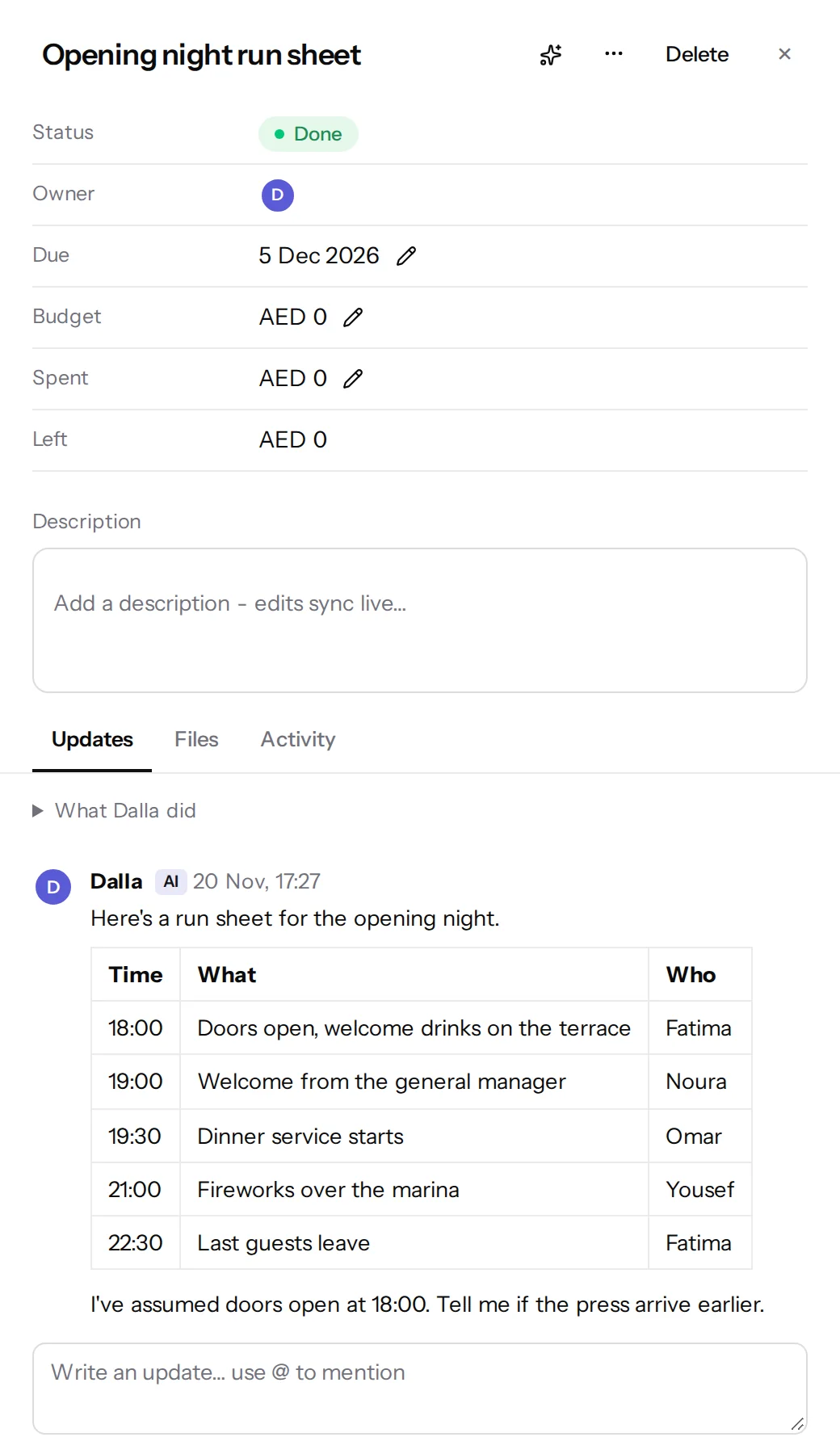
Dalla is in the people list. Assign it a task, and it works with what you can see, writes up what it did, and says so when it can't do something.
Give it a task
Make Dalla the owner of a task, such as a run sheet for opening night or a first draft of a brief. It does the work, posts the result on the task, and marks it done.
- It works with what the person who assigned the task can see, and no more.
- A change that needs approval waits for the approver.
- It doesn't phone or message anyone outside your organization.
Ask about any board
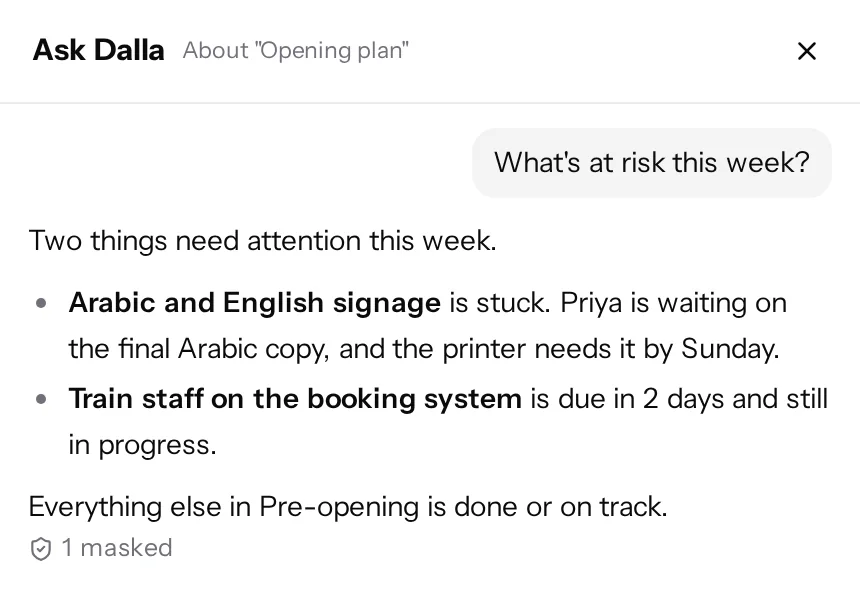
Ask what's at risk this week, what's stuck, or who owns what. Dalla answers from the board in front of you, so the answer is about your tasks and your dates.
It proposes, you confirm
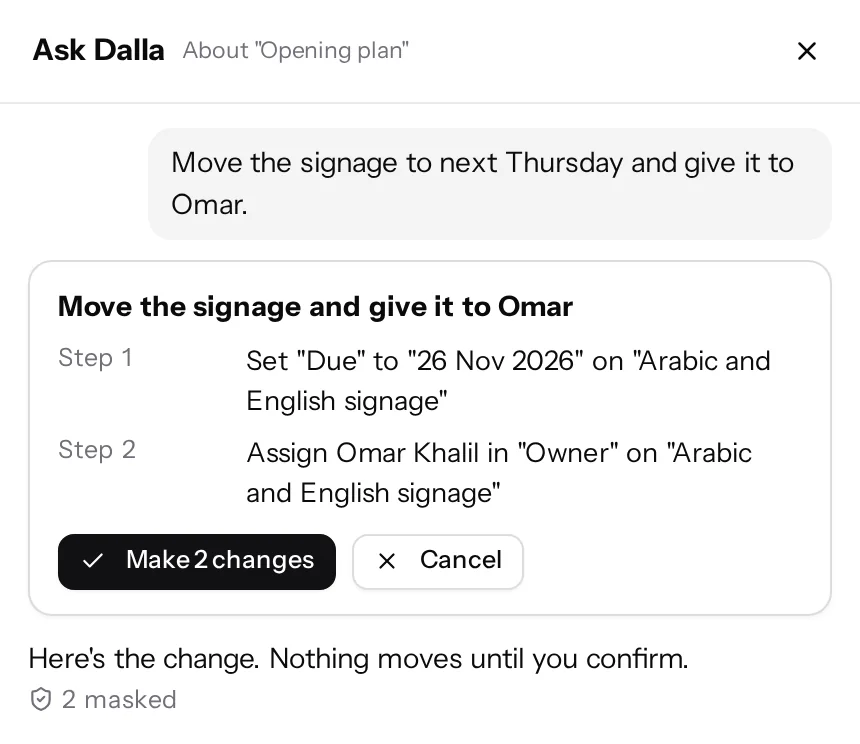
Ask Dalla to move a deadline or hand a task to someone else, and it shows you the change first. Nothing moves until you confirm, and you can take it back.
Describe a board you need and it drafts one the same way. More about Dalla as an AI agent.
Approvals and guests
Sign-off that holds, and sharing that shows only what you choose
Approval workflows
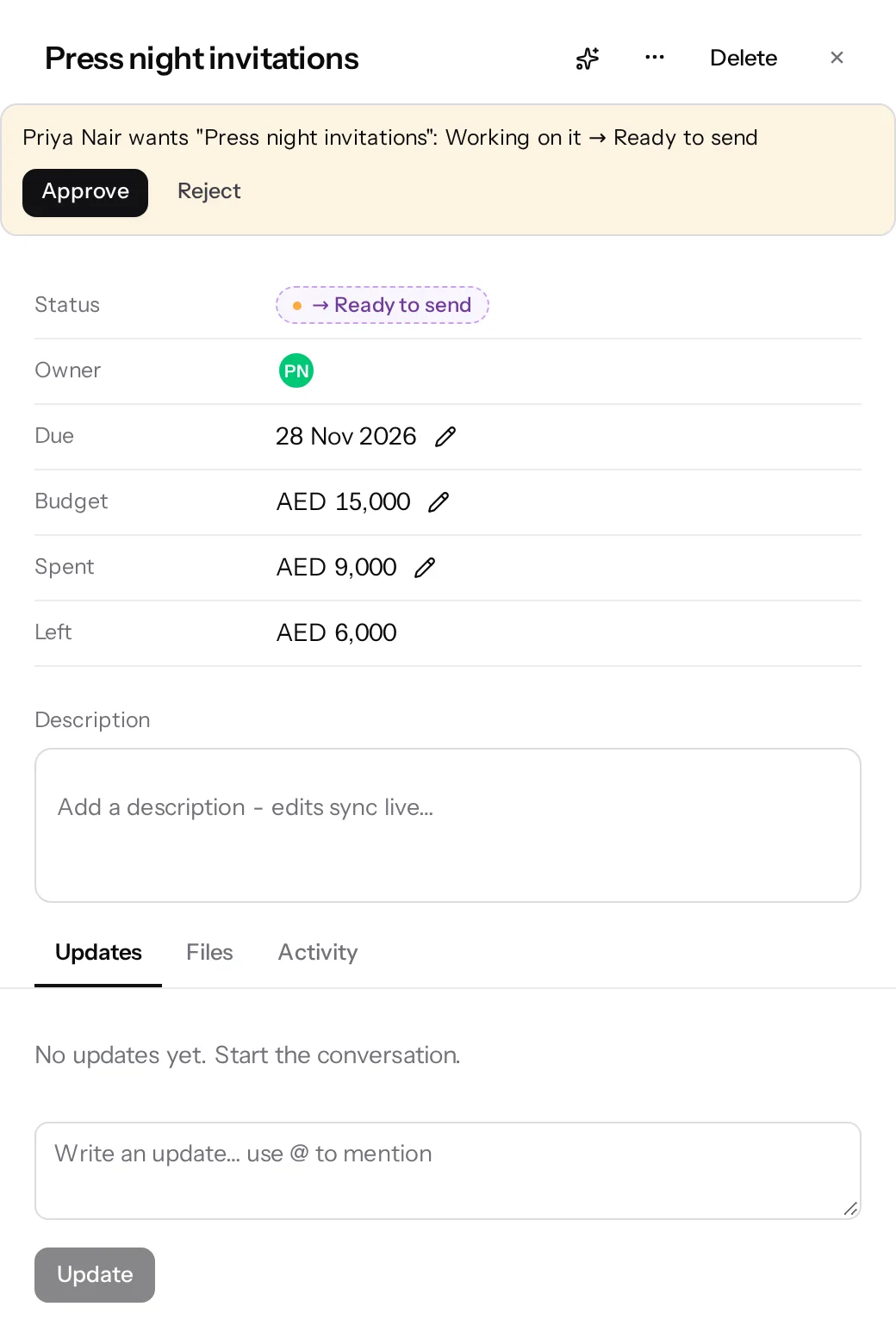
A status change can wait for a named approver. Until they decide, the task shows what it's waiting for. A rejection asks for a reason and lands as a comment on the task.
Dalla's own changes wait the same way.
Guests see only their part
Share one board with a client or a contractor. Columns you hide never reach their browser, and they can comment only if you allow it.
Roles you already have
Work uses the same sign-in, roles, groups, and projects as the rest of Dalla, so there is no second list of people to keep.
Forms
Forms that feed a board
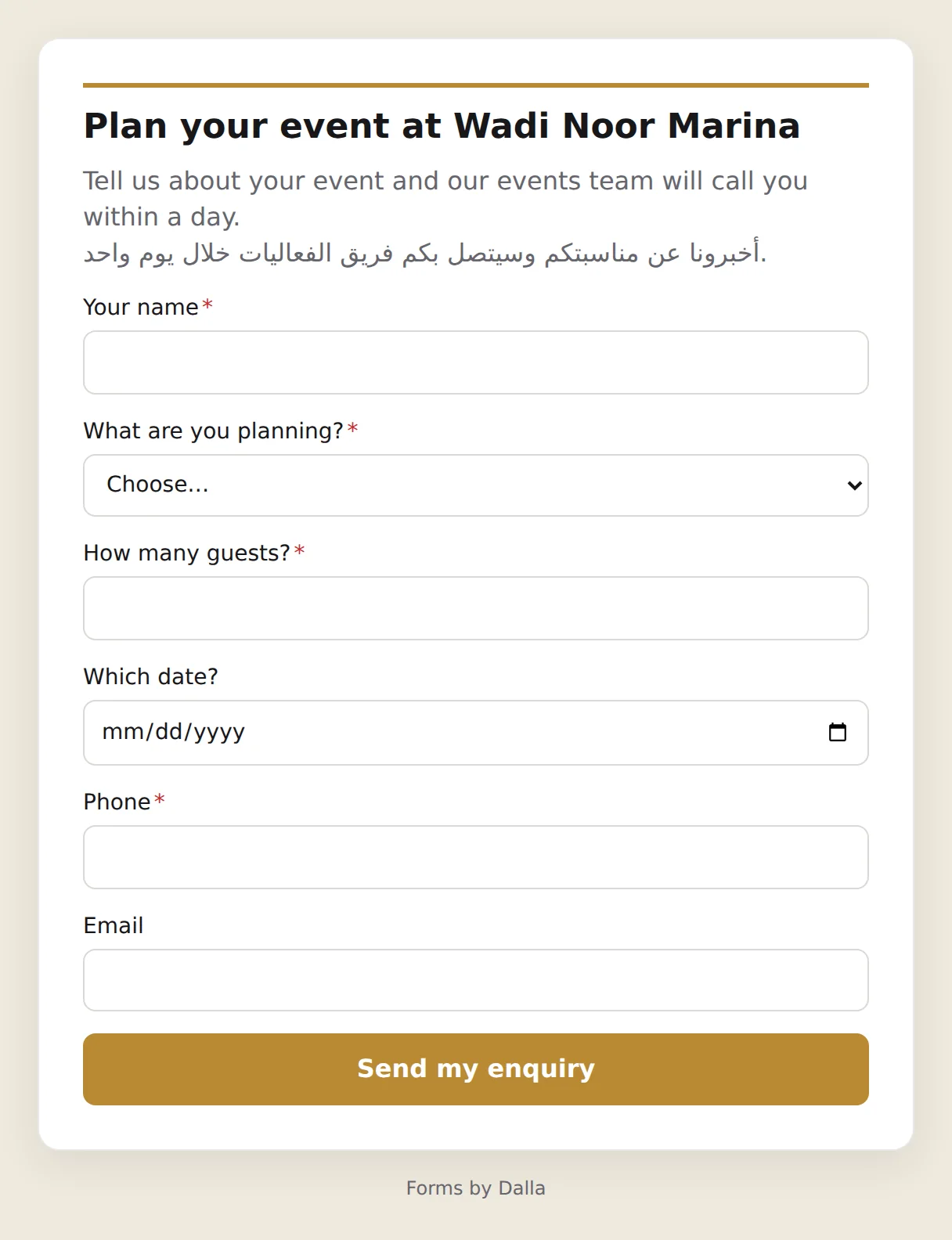
Requests, enquiries, and intake come in through a form and land on a board as tasks, with someone's name on each.
A form anyone can fill in
Share the form's link. People answer without an account, in English or Arabic, and follow-up questions show only when they're needed.
- Your logo and colours on the form.
- A password on the form, if it shouldn't be open to everyone.
- File uploads with the answer.

Also in Work
The rest of what a project needs
Docs with live boards
Write the brief in a doc and place a live board inside it, so the brief and the plan stay in step. People edit together, and earlier versions are kept.
Automations
Rules on a board take care of the routine steps, such as giving each new form answer to the right person.
Portfolios
Group boards into a folder and see progress, overdue tasks, and the next deadline for each one.
Templates and import
Start a board from a template, or import a CSV file: match the columns, check the preview, and bring the tasks in.
Files
Files attached to tasks, with one library for the whole project.
From a meeting to a board
Dalla writes notes and action items from a meeting recording. The action items can go straight onto a board.
Same perimeter
Your project data sits where your AI does
Work is part of Dalla, the sovereign AI workspace. It is installed wherever Dalla is, so there is one system for your security team to approve.
Where you run it
In your own cloud tenant, in your data centre, or on our UAE cloud. Work has no storage of its own somewhere else.
Masked like a chat
When Dalla reads a board or a form, it goes through the same masking and audit log as a chat. An Emirates ID on a clinic's intake form reaches a global model as a stand-in.
Local models only, if that's the rule
Run Dalla on local models and what it reads from your boards doesn't leave the country at all.
Common questions
Project management inside Dalla
Is Work a separate product?
No. Work is part of Dalla. It uses the same sign-in, roles, and projects as the chat, and it's installed wherever Dalla is, so there is one system to approve and one place your data sits.
Does it have a kanban board and a timeline?
Yes. Every board has table, kanban, calendar, timeline, workload, and dashboard views of the same tasks. The timeline is Gantt-style: tasks are bars across the dates, and you drag a bar to move it or its edge to change how long it takes.
Can we assign tasks to the AI?
Yes. Dalla is in the people list like a colleague. Give it a task and it works with what you can see, comments what it did, and closes the task when it's done. Changes that need approval wait for the approver. It doesn't phone or message anyone outside your organization.
Does Dalla change a board without asking?
When you ask Dalla for a change, it shows the change first. Nothing moves until you confirm, and you can take it back. A status that needs approval waits for the named approver, whether a person or Dalla asked for it.
Where is our project data stored?
Wherever your Dalla instance runs: in your own cloud tenant, in your data centre, or on our UAE cloud. Work has no storage of its own somewhere else.
Does Work need a global AI model?
No. If your rules allow local models only, Dalla runs on those, and nothing leaves the country. If you add global models, what Dalla reads from a board or a form is masked first, the same as a chat.
Can clients and contractors use our boards?
Yes, as guests on the boards you share with them. Columns you hide never reach their browser, and they can comment only if you allow it.
Can we bring tasks in from a spreadsheet?
Yes. Save the sheet as a CSV file and import it. You match its columns to the board's, check a preview, and the tasks arrive on the board.
Do people need an account to fill in a form?
No. A public form is a link anyone can open, in English or Arabic. You can also put a password on a form. Each answer lands on a board as a task.
Request access
See it with a project of your own
Tell us what your team runs today. We'll walk you through Work and the rest of Dalla, and talk through your own tenant, on-prem, and managed options.
- A 30-minute call with the people who built it
- A written data-flow summary your compliance team can keep
- Pricing for tenant, on-prem, and managed hosting